

If hreflang isn’t already part of your technical SEO toolkit, this is a good time to add it. If your site serves the same content to more than one country or language, hreflang is what tells Google which version to show which searcher. It’s a simple attribute in theory, but it trips up even experienced SEO practitioners in practice.
For sites with similar content published in multiple languages, hreflang is one of the most important pieces of creating SEO content you’ll implement, and getting it right pays off in more than search performance. It means serving searchers content that fits their market.
What Are hreflang Tags?
Hreflang is an HTML attribute that specifies all the URLs on a site that host the same content in different languages or for different regions. Google introduced the attribute over a decade ago to let publishers show the relationship between multiple versions of the same page. For a company running the same content in several languages, the hreflang tag tells search engines about those variations and helps each version reach the right audience.
For example, if someone Googles “Ikea” in the U.S., they’ll see this result:

While the same query by a searcher in Canada, would return this result:

Why all the fuss? The hreflang tag helps deliver results to users based on their country and language preference, making the hreflang tag’s meaning invaluable. It optimizes user experience and leads to improved search rankings. How’s that for a win-win?
Why Does hreflang Matter for SEO?
It all boils down to personalized results. All the hard work of translating a web page into multiple languages is lost if a user isn’t directed to the results tailored for them. In short, hreflang SEO allows Google to provide the most appropriate version of a company’s web page to users based on their language and location. Got a page that’s optimized for a user’s particular preferences? You want them to land there, and you want them to stay, for the right reasons, and hreflang is what makes that happen.
Hreflang’s reach isn’t universal, though. Google and Yandex both read hreflang and use it to decide which language or regional version to show a searcher. Bing skips hreflang entirely and reads its own content-language signal to determine a page’s audience instead, so a hreflang-only implementation tells Bing nothing. Baidu ignores hreflang entirely and leans on hosting location, domain registration, and licensing signals to work out who a page targets. If Bing or Baidu send you meaningful traffic, hreflang alone won’t steer those searchers to the right version. Plan for those engines separately instead.
Need another reason? Using a hreflang eradicates the issue of duplicate content. Imagine your company offers the same content in English on different URLs aimed at the US and Canada; the differences are likely minute and reflected in currency details (USD versus CAD) and lingo (imperial versus metric system).
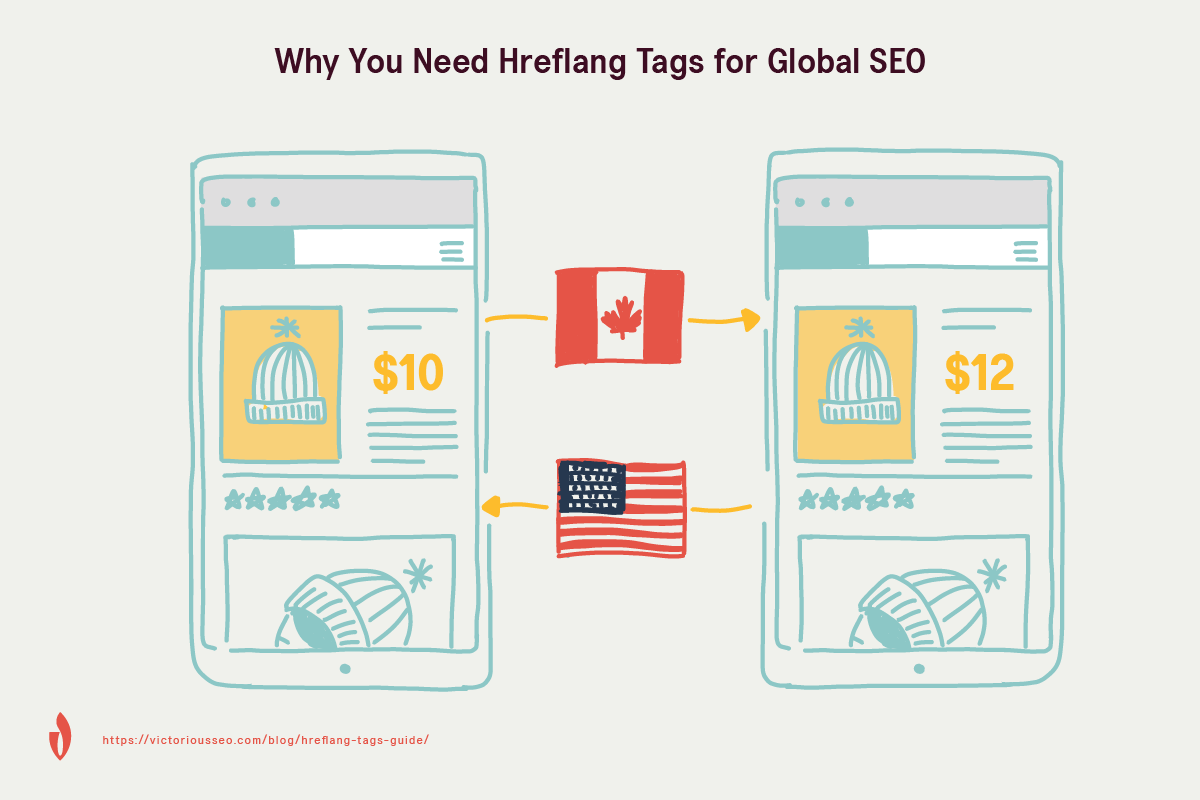
A hreflang tag tells search engines how to recognize the relationship between these pages, and the distinct audience each one was created for. Without hreflang, Google might be inclined to see these pages as duplicate content and return just one in search results; with hreflang, it is very clearly communicated to the search engine that although the content is (largely) the same, it’s optimized for different populations. How’s that for a feather in your cap (or touque, for our Canadian friends)?
Hreflang isn’t a ranking factor on its own, but it does feed into how Google decides which page in a set of duplicates to treat as canonical. Google’s documentation on consolidating duplicate URLs states plainly that “for canonicalization purposes Google prefers URLs that are part of hreflang clusters.” In practice, that means a page correctly linked into your hreflang cluster has an edge over a near-identical page that isn’t, when Google is deciding which version represents that content. A hreflang cluster with gaps or broken reciprocal links costs you the audience-matching benefit, and it weakens your case for which URL should be the canonical one.
These details matter, so read on to learn more.
How This Extends to AI Overviews and Other AI Search Tools
The same signal matters beyond traditional search results. Google’s Search Central documentation confirms that AI Overviews and its other generative AI search features are “rooted in our core Search ranking and quality systems” and draw from the same index Google uses for regular search. There’s no separate index that AI Overviews pulls from. Google has also been expanding how many people that index reaches. As of May 2025, AI Overviews are available in more than 200 countries and territories and more than 40 languages.
That means the page hreflang and canonical signals send Google to rank for a searcher’s language and region is also the page an AI Overview can cite, for a larger share of your international audience than a year ago. Get the signals wrong, and the version of your content priced in the wrong currency or written for the wrong market risks more than a lower ranking. An AI-generated answer could serve that version to the searcher.
Nothing about implementing hreflang changes because of AI Overviews. But when you’re auditing hreflang errors, treat them as an AI-visibility issue too, not just a ranking one.
What Do hreflang Tags Look Like?
Hreflang tags are simple, consistent, and use the following syntax:
<link rel="alternate" hreflang="x" href="https://www.example.com/new-page" />This format communicates that the linked page is an alternate version of the current page, appearing in language “x.” Hreflang tags are signals for search engines, not directives. In other words, the hreflang attribute signals to Google that a user who queries using language “x” will prefer this result over a page with largely similar content in language “y.” There’s another difference between signals and directives, too. Google may not recognize hreflang attributes it considers inaccurate. When that happens, other SEO factors take over, and an alternate version of your page can end up ranking higher than the version you intended for that searcher.
Hreflang Vs. Canonical Tags
Hreflang and canonical tags solve related but different problems, and conflicting signals between the two are one of the most common ways hreflang implementations break.
A canonical tag (Canonical Tags & URLs: A Simple Guide For Beginners) tells search engines which single URL is the authoritative version of a page when duplicate or near-duplicate content exists. Hreflang tells search engines which version of a page to show based on a searcher’s language or region. When you’re running the same content across multiple language or regional URLs, you need both. Canonical tags stop search engines from treating your language variants as plain duplicates competing against each other, while hreflang keeps each variant matched to the right searcher.
The two only work together when they agree. Each language or regional version should carry a self-referencing canonical tag, pointing to itself rather than to one “master” version, while the hreflang annotations on that same page point to every other language or regional variant. Point a hreflang annotation at a URL that isn’t itself canonical, and you’ve told search engines two contradictory things about which page belongs in results. Search engines faced with that kind of conflict are liable to ignore the hreflang annotation entirely and fall back to picking one canonical version for every searcher. That undoes the work you did to serve each market separately.
Using Hreflang HTML
For websites that have been translated into multiple languages, constructing a link rel alternate hreflang tag is as simple as 1-2-3. Each of these steps uses the syntax mentioned above () as the foundation.
Step 1
The hreflang attribute must contain a valid value that consists of the language; this information is communicated in a two-letter code called ISO 639-1 format. If you wanted to translate the example page into Portuguese, for example, it would look like this:
<link rel=“alternate” hreflang=“pt” href=“https://example.com/portugese-version” />
The region is optional and, if being used, should be in ISO 3166-1 Alpha 2 format. Here are two different tags you could use to target Portuguese speakers in Portugal and Brazil, respectively:
PT-PT: <link rel=“alternate” hreflang=“pt-pt” href=“https://example.com/pt/our-page” /> PT-BR: <link rel=“alternate” hreflang=“pt-br” href=“https://example.com/br/our-page” />
Regional codes are not necessarily as intuitive as language and country codes (the code for the UK is “gb” not “uk”), so double check! Use this list to verify accurate language codes before embedding the wrong information across your site.
Step 2
Each URL needs to return links to every other URL, all of which should point at the canonical, or preferred version of a given website. The more languages you have, the more html hreflang link elements you’ll need; while it might be tempting to limit them, it’s impossible to avoid this step. Rel=”alternate” hreflang=”x” markup and rel=”canonical” can and should be used together, and should point to the same URL for each language version. Every language should have a rel=”canonical” link pointing to itself. Starting from the example.com homepage, that would look like this:
<link rel="canonical" href="https://example.com/"> <link rel="alternate" href="https://example.com/" hreflang="pt" /> <link rel="alternate" href="https://example.com/pt-pt/" hreflang="pt-pt" /> <link rel="alternate" href="https://example.com/pt-br/" hreflang="pt-br" />
For more on how these two attributes interact, see the Hreflang Vs. Canonical Tags section above, or read Canonical Tags & URLs: A Simple Guide For Beginners for the full walkthrough on canonical tags on their own.
Step 3
The final step to successful hreflang construction is self-links. A hreflang attribute on each page requires a reference to itself and any pages that serve as an alternate for it. If one visited the pt-pt page, only the canonical would change:
<link rel="canonical" href="https://example.com/pt-pt/"> <link rel="alternate" href="https://example.com/"hreflang="pt" /> <link rel="alternate" href="https://example.com/pt-pt/"hreflang="pt-pt" /> <link rel="alternate" href="https://example.com/pt-br/"hreflang="pt-br" />
If you’re running hreflang on WordPress, you don’t have to hand-code every tag. If you use a translation plugin like WPML, it generates hreflang tags and multilingual sitemaps automatically once your language versions are set up, and its RankMath integration keeps those signals in sync if you’re running RankMath for SEO. A dedicated hreflang plugin can generate the tags for you directly if you aren’t running a full translation plugin, which saves the manual work once you’re managing more than a couple of language variants by hand.
The X-Default Attribute
Google highly recommends setting an x-default page, a single URL that establishes a fallback version for visitors whose language or location doesn’t match any of the versions you’ve specified. Without one, a searcher outside your targeted markets can land on whichever version happens to rank, which is rarely the version you’d choose for them.
Building on the Portuguese example above, adding an x-default that sends everyone else to your English homepage looks like this:
<link rel=”alternate” href=”https://example.com/” hreflang=”pt” /> <link rel=”alternate” href=”https://example.com/pt-pt/” hreflang=”pt-pt” /> <link rel=”alternate” href=”https://example.com/pt-br/” hreflang=”pt-br” /> <link rel=”alternate” href=”https://example.com/” hreflang=”x-default” />
A generic language-selector page works as the x-default target too, if you have one. This gives search engines somewhere defensible to send a searcher you haven’t explicitly planned for. Otherwise, you leave that decision to chance.
It’s a lot to digest! But you made it this far, which means you’re ready to learn how to implement hreflang tags.
Implementing Hreflang Tags
There are three ways to implement hreflang tags, and it all boils down to placement. You don’t have to tackle your whole site at once, either. Starting with just your homepage lets you catch branded and navigational searches in each language while you work out the rest of your implementation, as long as you treat it as a first phase rather than a stopping point. A homepage-only implementation that never expands to the rest of your pages is one of the more common hreflang mistakes, covered later in this guide.
| Method | Best for | Trade-off |
| HTML tags | A straightforward way to get started. | Can become messy and time-consuming to maintain as pages add up. |
| HTTP headers | PDFs and other non-HTML content. | Adds overhead to each request, which can slow the browsing experience. |
| XML sitemap | Sites managing many URLs in one file. | Markup gets long to generate, but it adds no page weight and needs no HTML edits. |
1. Implementing Hreflang Tags Using HTML
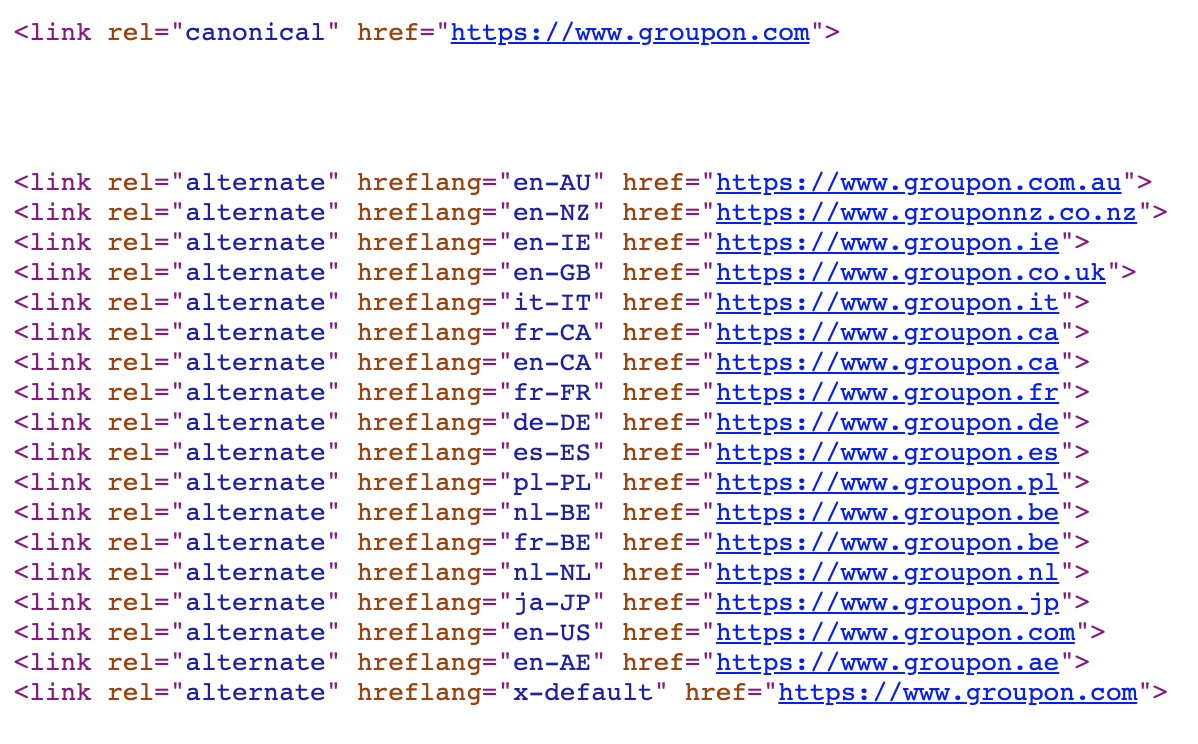
For those new to hreflang, using basic HTML tags is the easiest and quickest way to get going. Add any appropriate hreflang tags (see above) in the tag of your web page.
Example: The web admin of example.com wants to make their homepage accessible to English-speaking and Spanish-speaking users in the United States; using the following annotations in the of their site’s HTML accomplishes this:
<link rel="alternate" href="https://www.example.com" hreflang="en-us" />
<link rel="alternate" href="https://www.example.com/es" hreflang="es-us" />
If they wanted to show the homepage to Spanish-speaking users in Venezuela and Mexico, the hreflang annotation would look like:
<link rel="alternate" href="https://www.example.com/ve" hreflang="es-ve" />
<link rel="alternate" href="https://www.example.com/mx" hreflang="es-mx" />
The single biggest drawback of this method? Hreflang HTML can become messy and time-consuming rather quickly. Also, remember there’s a difference between the and elements; the contains elements that will not appear on the page, in this case, the hreflang attribute.
2. Implementing Hreflang HTTP Headers
For PDFs and non-HTML content on your website, use HTTP headers to implement hreflang. The name is a bit misleading. Implementation is not done on-the-page via or . Instead, it’s all done on the backend of a site. Using HTTP headers specifies the relative language of document variants and helps this content perform better in search.
Example: To identify a PDF document on your site in English and French versions, the link appearing in the HTTP header will look like this:
Link: https://en.example.com/document.pdf; rel=”alternate”; hreflang=”en”, https://fr.example.com/document.pdf; rel=”alternate”; hreflang=”fr”
The biggest drawback to this method of implementation? Using HTTP headers adds overhead to each request made on your site, which can slow down the user’s browsing experience.
3. Implementing Hreflang in Your XML Sitemap
The final option for implementing hreflang is using XML sitemap markup; this uses the xhtml:link attribute in XML to add the annotation to every URL.
While there’s more than one way to implement hreflang into your XML sitemap, we recommend something like this:
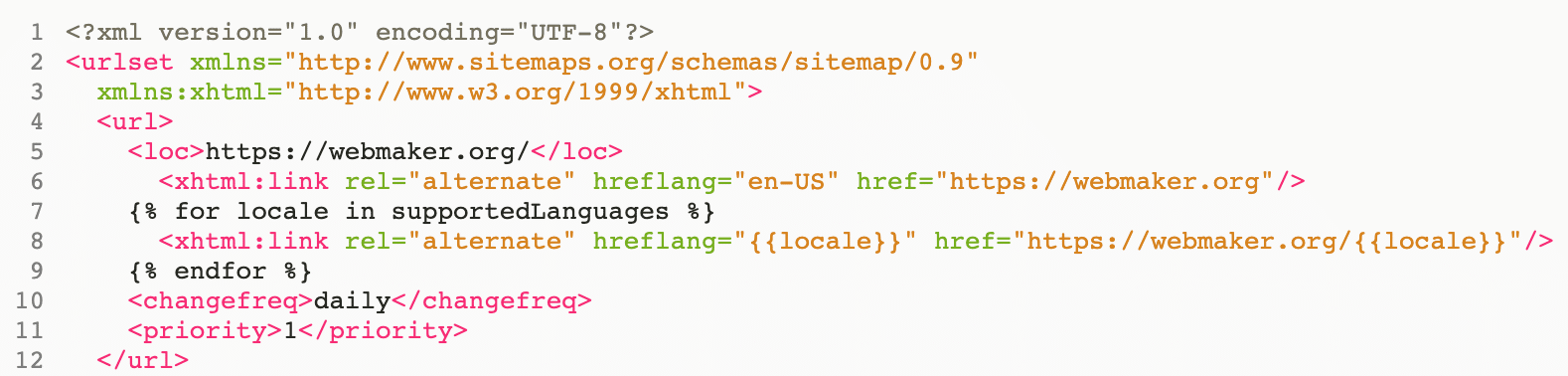
Alternatively, you could use some of the examples below.
A word of caution: the markup needed for a single URL with a pair of language/location variables will appear lengthy! That said, read on for the benefits. (There are many!)
Example:
<url>
<loc>https://www.example.com/uk/</loc>
<xhtml:link rel="alternate" hreflang="en" href="https://www.example.com/" />
<xhtml:link rel="alternate" hreflang="en-au" href="https://www.example.com/au/" />
<xhtml:link rel="alternate" hreflang="en-gb" href="https://www.example.com/uk/" />
</url>
Notice the third URL is self-referencing; this specifies the particular URL is meant for en-gb, and it specifies two other language/location combinations. Now, implementing both of those URLs into the sitemap would look like this:
<url>
<loc>https://www.example.com/</loc>
<xhtml:link rel="alternate" hreflang="en" href="https://www.example.com/" />
<xhtml:link rel="alternate" hreflang="en-au" href="https://www.example.com/au/" />
<xhtml:link rel="alternate" hreflang="en-gb" href="https://www.example.com/uk/" />
</url>
<url>
<loc>https://www.example.com/au/</loc>
<xhtml:link rel="alternate" hreflang="en" href="https://www.example.com/" />
<xhtml:link rel="alternate" hreflang="en-au" href="https://www.example.com/au/" />
<xhtml:link rel="alternate" hreflang="en-gb" href="https://www.example.com/uk/" />
</url>
Assuming you’re able to look past the sea of text, you’ll notice only the URLs within the element change. Everything else stays the same. This method relies on each URL having a self-referencing hreflang attribute and returns links to other URLs.
Looks like a lot of work, right? On the one hand, yes, this method is lengthy and requires quite a bit of output when doing this for many URLs. That said, the benefit is simple. Normal users won’t be bothered by this markup. It adds no extra page weight, and generating it doesn’t require a lot of database calls on page load.
Finally, implementing hreflang through the XML sitemap comes with a major benefit. Everything is defined in a single file. This eliminates the need for editing multiple HTML documents each time a page is changed or deleted. Plus, zero site slowdown. In other words, there’s a lot to like!
Still not sure which mode of implementation to choose? For more tips on website architecture and site structure, visit technical SEO best practices.
Semi-Automating Hreflang for Larger Sites
If you’re managing hreflang across dozens or hundreds of URLs, hand-coding tags for every page stops being realistic. There’s a common workaround. Build a spreadsheet listing every URL alongside its language and region codes, then use a template or script to convert those rows into the XML sitemap markup shown above. Several free and paid tools can generate that sitemap for you once your spreadsheet is set up, which turns a manual, error-prone process into something you maintain by updating rows instead of hand-editing markup.
Finding & Fixing Hreflang Issues
Implementing hreflang correctly is only half the job. An Ahrefs analysis of 374,756 domains found that 67% of hreflang implementations had at least one issue, which makes ongoing auditing just as important as getting the initial setup right. Running a regular audit of your chosen implementation will make sure it’s set up correctly. This is the same checklist our technical SEO team runs against every client site with international pages. It starts with a full crawl using a tool like Screaming Frog, paired with a dedicated hreflang checker, to catch what a manual page-by-page review misses. Communicating with individuals in your company who deal with site content will go a long way. Make sure they understand hreflang, so they don’t unintentionally break your implementation.
If a page is deleted, check whether its counterparts have been updated. When a page is redirected, change the hreflang URLs on its counterparts.
In the meantime, here is a quick rundown of the most common hreflang mistakes and how to fix them:
1. Self-Reference Hreflang Annotation Missing
What’s the big deal?
It’s important to use a self-referencing hreflang tag each time you add a hreflang tag to a web page. Remember Google states, “each language version must list itself as well as all other language versions.”
How To Fix It:
Review any affected pages and add a self-referencing hreflang tag to the original language version using your chosen method of implementation.
2. Hreflang Annotation Invalid
What’s the big deal?
Search engines ignore invalid hreflang tags, which leads to alternate versions of your web page being overlooked.
How To Fix It:
Review affected pages and remove invalid hreflang tags and replace with those that use valid language/location code formats.
3. Page Referenced for More Than One Language in Hreflang
What’s the big deal?
Each piece of content is designed to serve a single language/language-location. Two or more conflicting references confuse search engines, which then ignore the hreflang attributes.
How To Fix It:
Review affected pages and inspect URLs that reference a particular page in their hreflang attributes for errors. Remove any incorrect hreflang attribute and leave only one correct attribute per language.
4. Missing Reciprocal Hreflang (No Return-Tag)
What’s the big deal?
Hreflang tags are bidirectional (if page A links to page B in hreflang annotations, page B must link to page A in return).
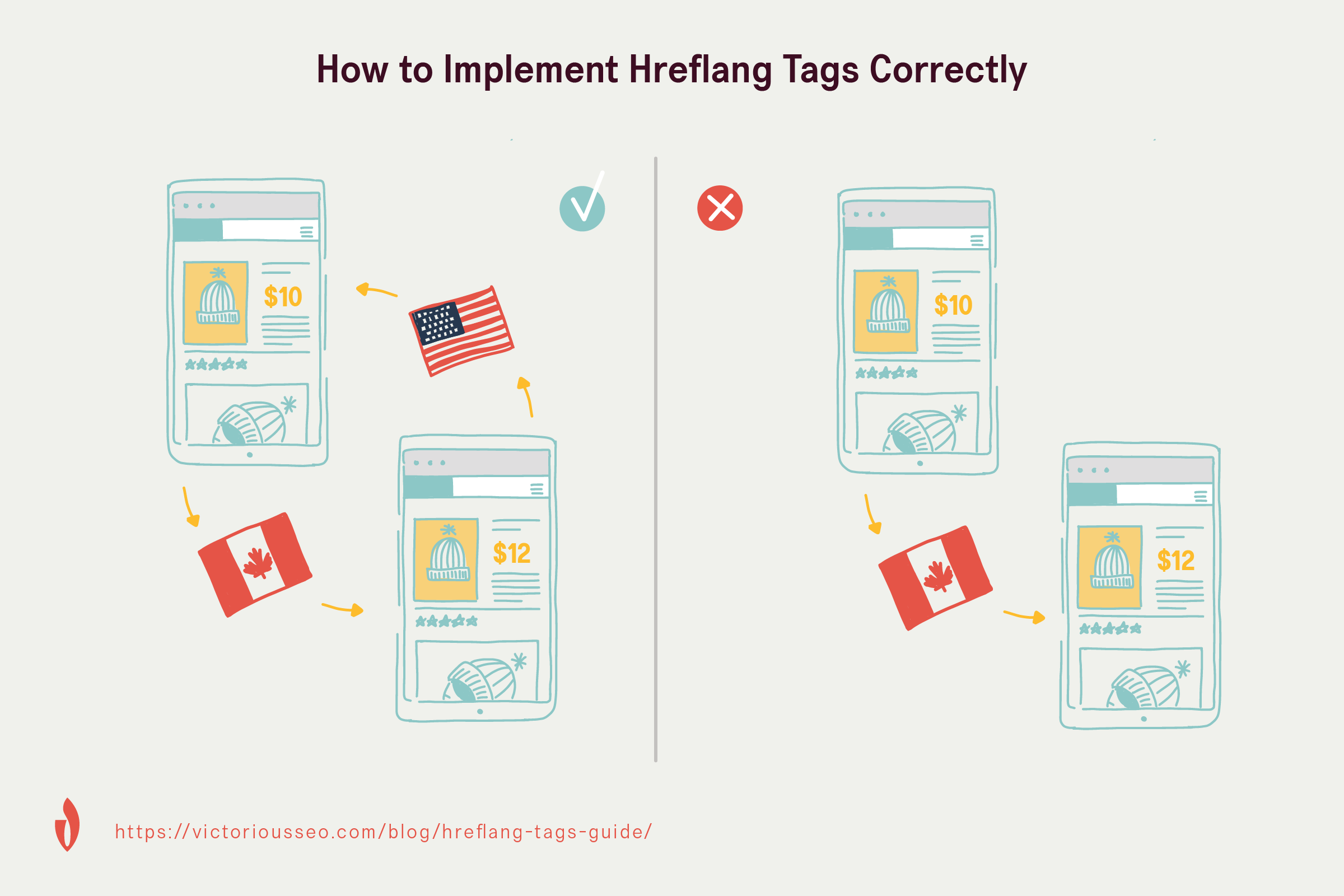
How To Fix It:
Review affected pages and add bidirectional hreflang tags where needed. Google Search Console’s International Targeting report used to flag missing return tags directly, but Google discontinued that report in September 2022. Crawl your site with Screaming Frog or Sitebulb instead. Both surface missing reciprocal tags across your whole site at once.
If a complete bidirectional set becomes difficult to maintain as you add languages, Google’s guidance allows you to omit some languages on some pages; Google will still process the pairs that do point to each other. Linking each newly added language back to your original or dominant language matters more than linking new variants to each other. If your site started in French, for example, prioritize bidirectionally linking a new Spanish or Portuguese version to your established French pages over linking those newer versions to each other.
5. Hreflang to Non-Canonical
What’s the big deal?
Rel=”alternate” hreflang=”x” instructs search engines to display the translated (localized) version of a page; rel=canonical attribute will flag that this isn’t the authoritative (canonical) version. These contradicting attributes will confuse search engines.
How To Fix It:
Review affected pages and modify hreflang annotations, so they point to canonical URLs only. If you stumble upon a page with an invalid canonical tag, remove it. This ensures the hreflang attribute is properly understood and followed by the search engine.
6. Hreflang and HTML Language Mismatch
What’s the big deal?
Search engines (other than Google) become confused when there’s an inconsistency between the declared hreflang and HTML language attribute for one or more URLs; it’s important to keep these two attributes consistent with one another.
How To Fix It:
Review affected pages and change the HTML language attribute to ensure it remains consistent with the declared hreflang attribute.
7. Hreflang to a Broken Page
What’s the big deal?
Google can’t return content that doesn’t exist! Therefore, hreflang attributes that point to dead pages will be overlooked.
How To Fix It:
Review affected pages and change hreflang annotations to ensure they link to working pages.
8. More Than One Page for the Same Language in Hreflang
What’s the big deal?
When one or more URLs reference two or more pages for the same language (or language-location) in hreflang annotations, the search engine becomes confused.
How To Fix It:
Review affected pages and remove one of the hreflang annotations, so a single page is referenced for each language.
9. X-Default Hreflang Annotation Missing
What’s the big deal?
While x-default hreflang attributes are optional, they are recommended as an SEO best practice for all hreflang annotations. See the X-Default Attribute section above for what this looks like in practice.
How To Fix It:
Review affected pages and ensure each has an “x-default” hreflang attribute set that points to a page NOT specific to a particular language or location.
10. Using Relative Instead of Absolute URLs
What’s the big deal?
Google’s hreflang documentation requires every hreflang annotation to use a fully qualified, absolute URL. A relative path like /foo or //example.com/foo isn’t accepted, so a hreflang tag built with one won’t work, no matter how correctly everything else is set up.
How To Fix It:
Review your hreflang implementation and confirm every href value is a complete, absolute URL, including the protocol (https://). This applies across all three implementation methods: HTML, HTTP headers, and XML sitemaps.
11. Hreflang Implemented on the Homepage Only
What’s the big deal?
Starting with the homepage is a reasonable first phase, but some sites stop there. If your other pages have language or regional variants and none of them carry hreflang annotations, you’ve told search engines about one relationship in your site and left every other duplicate-content risk unaddressed.
How To Fix It:
Treat homepage-only hreflang as a temporary state with a deadline, not a finished implementation. Extend the same annotations to every page that has language or regional variants, using whichever of the three methods above fits your site.
12. Hreflang Tags Added to Noindexed Pages
What’s the big deal?
A noindex directive tells search engines not to include a page in their index at all. Adding hreflang annotations to a page you’ve also noindexed sends a contradictory signal. You’re asking search engines to route searchers to a version of the page they’ve been told to ignore.
How To Fix It:
Check your noindexed pages for hreflang annotations and remove them, or reconsider whether the page should be noindexed in the first place if it’s meant to serve a specific language or region.
13. Hreflang Pages Blocked by Robots.txt
What’s the big deal?
If robots.txt blocks a page from being crawled, search engines can’t read the hreflang annotations on it, and they can’t verify that it reciprocally links back to the pages that reference it. A blocked page effectively breaks every hreflang relationship that depends on it.
How To Fix It:
Check your robots.txt file against your list of hreflang URLs and remove any disallow rule that’s blocking a page your hreflang implementation depends on.
Still have questions? Check out the Core Web Vitals algorithm update, which outlines additional tech SEO practices you’ll want to be up-to-date on this year.
Issues Google May Ignore
You’ve done your part following best practices. Even so, there are times when search engines ignore certain issues. This primarily happens when a search engine sees the same issue repeatedly and believes it can be accounted for on their end. Don’t sweat it! This is super helpful. Here are a handful of hreflang tag issues that Google may account for on its own, with some caveats:
- Underscore instead of a dash: This is a common error. Long-standing informal guidance from Google’s search team suggests Google’s systems can often correct for it, but that behavior isn’t documented in Google’s current hreflang guidance, so don’t rely on it. Fix the code directly. Don’t count on Google correcting it for you.
- Using en-UK instead of en-GB: We talked about this earlier, the fact that regional codes are not necessarily intuitive (the UK’s ISO code is “gb,” not “uk”). Some SEO practitioners report Google correcting for this specific substitution, but Google’s documentation doesn’t confirm it. Treat it as unconfirmed, and use the correct code, en-GB, from the start.
- Hreflang not having a self-reference: Google’s current documentation states this as a requirement, not a suggestion: “Each language version must list itself as well as all other language versions.” Google may still process a cluster that’s missing a self-reference on one page, but that’s Google being forgiving about an error, not a documented exception you should plan around. Add the self-reference.
Redirecting Users: A Word of Caution
In many cases, websites will redirect users based on a combination of cookies, IP address, and/or browser In many cases, websites will redirect users based on a combination of cookies, IP address, and/or browser language; beware the redirect! For users, this can translate to a frustrating (read sub-par) experience; for search engines, trying to index your content becomes problematic. Redirecting users can also break the established connections your hreflang tags depend on.
Here’s what Google has to say about the practice:
Do not use IP analysis to adapt your content. IP location analysis is difficult and generally not reliable. Furthermore, Google may not be able to crawl variations of your site properly. Most, but not all, Google crawls originate from the US, and we do not attempt to vary the location to detect site variations. Use one of the explicit methods shown here (hreflang, alternate URLs, and explicit links).
That guidance points to a related principle. Treating a search engine crawler differently than you’d treat a human user, in this context, counts as cloaking (the practice of presenting different content or URLs to human users and search engines), which is a violation of Google Search Essentials.
Want an approved fix that provides users with the results they expected? Use the same detection logic to suggest a better version of the page for the user on a small banner. The one caveat is, if it’s too large, it could be seen as an interstitial (causing content to be fully or partially obscured for the user).

Pro Tip
There’s a Google Chrome extension that automates checking a site’s hreflang deployment. Get the inside scoop about this and other SEO Chrome add-ons that can help you manage daily SEO maintenance. For a full-site crawl, Screaming Frog and Sitebulb, mentioned above, flag every hreflang error, not just missing return tags. That’s how Victorious audits hreflang for clients running multi-region sites.
Your International SEO Partner
Understanding and troubleshooting hreflang is a requirement for today’s SEO. Want to be sure you’re doing everything you can to boost your site’s visibility in every corner of the world? Victorious digs deep to discover local cultural tendencies and buying patterns that influence search to determine the best strategy for your international SEO campaign.
Ready to get started with an SEO agency? Sign up for your Free SEO Consultation today, and let Victorious guide you through the process.
Hreflang FAQs
What does hreflang do?
Hreflang tags tell search engines which language or regional version of a page to show a given searcher, so a company running the same content for multiple countries or languages doesn’t get flagged for duplicate content or shown to the wrong audience.
What is x-default in hreflang?
X-default is a fallback hreflang value that tells search engines which page to serve a searcher whose language or region doesn’t match any of the page’s specified alternates, typically a language-selector page or a company’s global homepage.
Do hreflang and canonical tags need to match?
They don’t need to be identical, but they need to agree. Each language or regional version should carry a self-referencing canonical tag, while hreflang annotations point to every other language version. Point hreflang at a URL that isn’t canonical, and search engines may ignore the hreflang signal entirely.
Is hreflang a ranking factor?
No. Hreflang is a signal, not a ranking factor. It doesn’t directly influence how high a page ranks, but Google does prefer pages that are part of a hreflang cluster when deciding which version of duplicate content to treat as canonical.
How do I check for hreflang errors?
Crawl your site with a tool like Screaming Frog or Sitebulb to surface missing return tags, invalid codes, and broken references across every hreflang annotation at once.