

Key Takeaways
- Calculate your Black Friday SEO start date by comparing your page’s referring domains against the top five results for your target query, then working backward from your monthly link-building rate.
- Review last year’s Google Search Console data to find holiday queries you already rank for on the wrong pages, then build dedicated content for them.
- Build one evergreen landing page per holiday or audience segment instead of a new page every year, and keep it live and updated instead of letting it expire.
- Structure your evergreen page with a direct, summary-first opening so AI Overviews can quote it, the same mechanism that earned one Victorious client 84 new AI citations in six weeks.
- Use Google Business Profile Offers and fresh customer reviews to capture local shoppers who are already close to buying.
Every year around this time, Victorious receives a lot of requests for guidance on how best to improve organic search visibility to capture visitors looking to do their holiday shopping online. The problem is that these requests tend to arrive three to six months too late to hit that lead-time window. If you’re reading this already behind schedule, the five tactics below still apply. You’ll just have less runway to close the gap before Black Friday and Cyber Monday arrive.

Ready To Find The Right SEO Agency?
Download our ebook to get all the tools & templates you need to build a robust RFP process and find the perfect SEO agency.
1. Identify Link Acquisition Needs To Pinpoint Campaign Start Date
One of the more straightforward methods for determining when to launch your SEO holiday season prep is to uncover the number of Referring Domains (RDs) needed to have competitive parity with the sites you want to emulate. Once you have that number, you can work backward to land on a start date.
Pull this number yourself before you rely on anyone else’s figure. In a backlink tool like Semrush or Ahrefs, check the referring domain count for the top five organic results on your target holiday query, and average them.

Let’s say your own pull showed an average of 50 RDs across the top five results, and that your link acquisition efforts, when firing on all cylinders, can net you 10 links a month to a specified URL. And for the sake of the example, let’s assume the URL is brand new with zero RDs.
From here, it’s a simple math problem. You take the average number of RDs for top-five results, subtract the current number of RDs of your target URL, and divide that by your monthly link acquisition rate. This is the number of months you need to achieve competitive parity.
So, for our example, we need five months before the holiday (in this case, Black Friday) to make sure we’ve met the off-site requirements of these specific search engine results pages (SERPs).
Even if you have less time than that to your target holiday, it’s still worth implementing a link-building strategy to increase your page’s authority. You just won’t have time to attain competitive parity for referring domains.
Not all links are created equal. You may need more or less than the average based on the quality of the links you acquire However, I still recommend you start with the absolute count you arrived at above and adjust your efforts as time progresses.
Check Your Technical Readiness While the Clock Runs
Your link-building lead time is also your technical lead time. Confirm your Core Web Vitals scores and clear out any 404s or broken redirects before the holiday traffic spike hits, since that spike exposes a slow or unstable page faster than normal traffic ever would. Do this work in the same window as your link building, not after it, so the page is ready the moment the links land.
2. Look at Last Year’s Google Search Console Clicks & Impressions
Before embarking on content creation, dive into your site’s Google Search Console data to glean insights into any previous Cyber Monday, Black Friday, and general holiday search queries that your site surfaced for last year.
1. Navigate to your site’s property within Google Search Console.
2. Click ‘Search Results’ in the left-hand navigation.
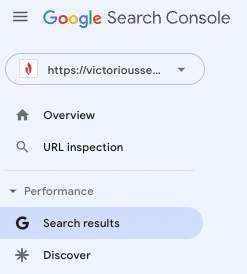
3. Click ‘Date’ to change the report’s time period.

4. Input a range of dates that covers the holidays you want to optimize for and click ‘Apply.’

5. Click ‘+’ to add a filter, and then select ‘Query.’

A box should pop up, allowing you to filter the results. Add a keyphrase like “black Friday” (or any other variants you’ve identified, for example, cyber Monday, Christmas, and the others) to surface queries containing that phrase. Click ‘Apply.’

Scroll down and check out the box beneath the graph to see the various search terms containing “black Friday” or whichever phrase you filtered results by.

Once you’ve identified the relevant keywords your site has shown up for in the past, reconcile those against the URLs on your site that are surfacing for those queries, and assess whether or not they adequately address the query’s intent. To do this, click on the query to see which URLs Google is serving for that search term.
Two recent additions to Search Console’s Insights report are worth checking too. “Query groups,” which Google launched in October 2025, uses AI to cluster every phrasing of the same underlying question, so you don’t have to guess each variant of “black Friday” by hand. A branded-versus-non-branded filter, launched the following month, lets you separate searches for your own brand name from generic category searches, which keeps your holiday-intent read clean of people who were already looking for you specifically. Run this check more than once this season. Holiday search intent tends to shift from broad browsing early on to specific purchase intent closer to the date.
You’re looking for ranking queries from the past that are served up from URLs that are fundamentally mismatched for search intent (what the searcher is actually trying to accomplish, not just the words they typed). For example, a site may have a general curling iron product page that Google has a history of surfacing for Black Friday-related queries.
Once you’ve got the list of URLs with intent mismatch, you can group the queries thematically and build out content based on those themes. And because Google has already shown it favors your site for those queries, you likely have some authority built up for them. As a result, building out pages dedicated specifically to those holiday-related themes may be quick wins.
Tip: Run the search terms through a keyword research tool like Ahrefs to determine search volume and keyword difficulty to help you prioritize your content creation.
3. Determine Content Needs
Next, let’s decipher your content needs. To do that, I use SurferSEO. SurferSEO allows you to find out the word count you need to strive towards, the mix of important and semantically-related keywords to include, and more.
After navigating to SurferSEO’s Content Editor, plug in the keyword you want to gather intel on, change the settings to your liking, and hit ‘Create Content Editor.’

At Victorious, we usually default to utilizing the ‘Mobile’ setting in the toggle shown above because it better represents what Google is looking for with mobile-first indexation.
Once the query is complete, click on it. On the right-hand side, you’ll see recommendations for your content.

Click on the gear at the top to enter the settings.
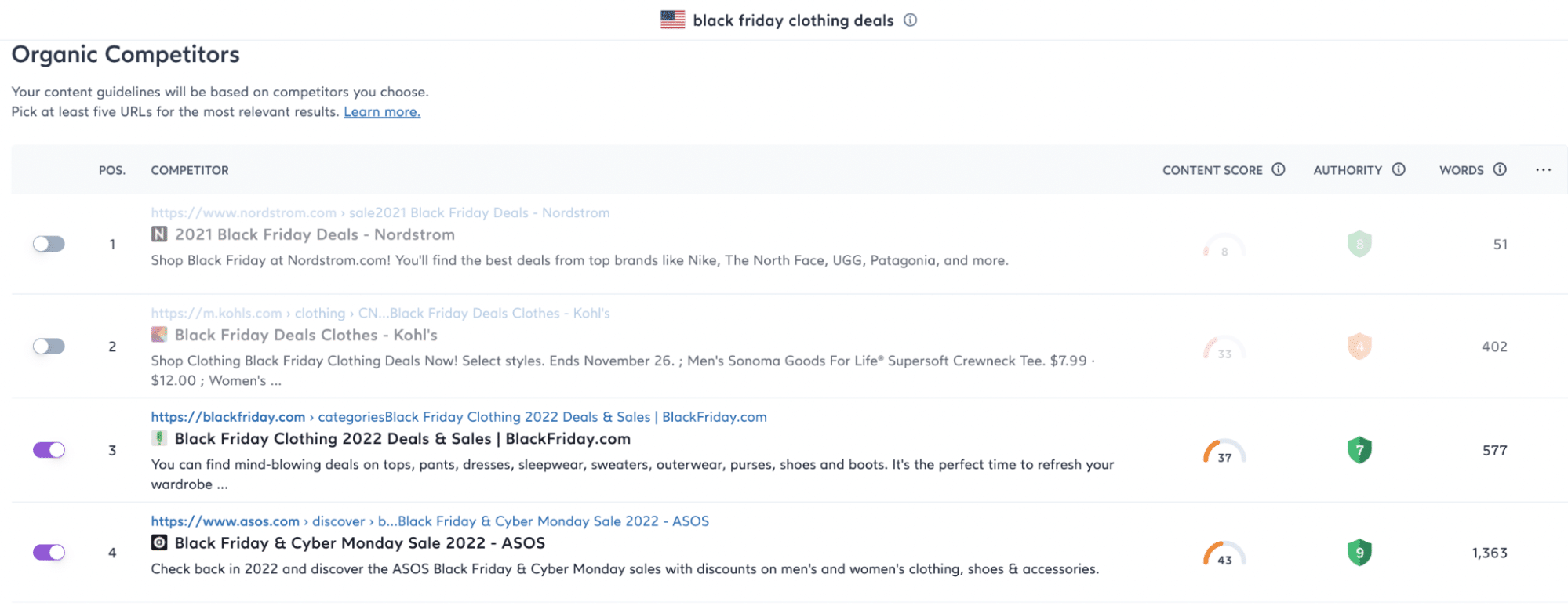
This section will allow you to choose which URLs you want to target. Competitive selection is very important. You need to make sure you’re selecting non-anomalous results. For example, in our results for “black Friday clothing deals,” Target is in the top five with a total word count of 38. A quick review of the URL in question shows that it’s very thin on content and most likely ranking due to the strength of the domain as a whole. Because of this, we won’t include the result in our list of competitors to review.
After you’ve chosen your top five competitors, SurferSEO will reset the recommended content guidelines, including total word count, the number of paragraphs, and more. While you can spend some time reviewing and modifying the settings available, we recommend making it easy on yourself and moving forward with their recommendations by clicking ‘Let’s go’ in the bottom right corner.

By this point, you should now have a word count range to target with your content, as well as insight into the individual words you should include to ensure competitive parity from the content perspective.
From there, it’s as simple as unleashing your writers on the prompt and guidelines provided.
Get Your Product Feed Ready Too
If you run organic free listings or Shopping surfaces alongside your content, your product feed needs the same lead time your content does. Google announced in May 2025 that Google Merchant Center would begin surfacing AI-generated insights that identify an upcoming holiday on their own, recommend which products and discounts to promote, and pre-fill the promotion for you. Check that your pricing and promo data are synced in your feed before the sale starts. A mismatched feed gets listings disapproved during the exact window this article is about.
4. Create Evergreen Holiday Landing Pages To Maximize Backlinks
Create a singular Black Friday deals landing page for each holiday deal keyword theme (the cluster of related search terms that point at the same holiday intent, not just one exact phrase) you identify in your keyword research process. That’s the scalable suggestion I got when I asked Victorious’s own SEO team for their best holiday tip.
For example, instead of creating a new page every year targeting things like “New Years 2026 deals,” “New Years 2027 deals,” etc., you should create a single “New Years [year] deals” page that you update every year based on a review of what search engines are rewarding content-wise around that query.
By maintaining one page that you update yearly, you open up the ability to accrue links year-over-year rather than needing to “reset” with each new year, ultimately saving you a lot of time and resources.
In treating these pages as a part of your core SEO strategy, taking care not to neglect them but also not hyper-focus on them, you can avoid a lot of the stress you’d experience if you had to do this process every holiday season from the ground up. Approaching these pages as “evergreen” pages provides a template for you to work from, and templates are always time savers.
Still need convincing? Here’s how ASOS uses this tactic for its Black Friday landing pages. ASOS has grown this approach since this article first covered it: the brand now runs separate category-specific evergreen pages, one for menswear and one for womenswear, feeding into a central Black Friday discovery hub, rather than a single page covering everything. Navigating to their “black Friday clothing deals” URL, you’ll see this:

However, a quick review of the screenshot captured just months ago by the Internet Archive’s Wayback Machine shows this:

ASOS’s shift from one page to a hub of category pages is itself worth copying, and it’s the next tactic below.
Quick tip: Don’t use the year in your URL. Otherwise, you end up dating your content. If you have a URL with a year in it, consider using a 301 redirect to send link equity to your new evergreen holiday URL.
Scale Beyond One Page for Larger Catalogs
A single evergreen page works until your catalog is too broad for one page to rank for all of it. At that point, build one evergreen page per audience segment or category, such as menswear, womenswear, or a specific product line, instead of forcing every holiday keyword onto one URL. Multiple pages risk competing against each other for the same queries, so interlink every holiday asset, including blog posts, gift guides, and category pages, back to one central hub page. Search engines treat that hub as the authoritative page, and the spoke pages reinforce it.
Add Schema Markup to Your Holiday Pages
Mark up your evergreen holiday pages with Product and Offer schema so search engines can read price, availability, and sale dates directly from the page instead of inferring them from the copy. This is a basic lever for standing out in results, not a ranking shortcut, so it’s worth setting up well before the page goes live.
Quick tip: Don’t use the year in your URL. Otherwise, you end up dating your content. If you have a URL with a year in it, consider using a 301 redirect to send link equity to your new evergreen holiday URL. And when this year’s version of a page is superseded, archive it to its own URL instead of overwriting it in place. Victorious’s own content calendar guidance calls for exactly this. Reuse the main URL year over year, and archive each year’s specific content to a separate URL so you don’t lose the historical page entirely.
Give Cyber Monday Its Own Line
Cyber Monday deserves a line of its own on this page, not a silent fold into “Black Friday.” Add a short section, or even a single paragraph, that names Cyber Monday specifically and extends your Black Friday messaging and keywords to it, rather than building it a separate page. Readers searching for Cyber Monday prep specifically won’t find a page relevant to them if the term never appears on it.
Promote the Page Before the Rush
Building the page is half the job. Once it exists, drive early signals to it: share it on social, feature it in your email newsletter, and if you run a gift-guide or seasonal content series, link back to the hub page from every related post. A page nobody points to outside your own site sits undiscovered no matter how well you built it.
5. Use Google Business Profile Promo Posts
If your business has a local presence, your Google Business Profile can be an immediate source of capturing holiday attention through posts promoting your holiday deals. Google now calls this post type an “Offer” rather than a “Promo Post,” confirmed against Google’s current documentation. It automatically adds a “View Offer” button, plus fields for a coupon code and terms and conditions.
The only caveat is that your potential customer will need to be fairly far along in their purchase journey since the posts won’t surface unless they search specifically for your business.
Follow Google’s step-by-step instructions for publishing a post here.
While you’re in your profile, update your holiday hours too. Set special hours for the days you’re closed or running shortened hours. A shopper who shows up to a listing showing “open” during a holiday closure is a worse outcome than one who never found the listing at all.
Add Reviews to Your Holiday Readiness
Reviews do double duty during the holidays. They factor into local rankings, and they’re often the deciding factor when a shopper is choosing between two businesses. Ask recent customers for reviews before your peak season starts, and respond to the reviews you already have. A profile with recent, answered reviews reads as active. One with none, or with unanswered complaints, reads as abandoned right when the most shoppers are looking.
How AI Shopping Surfaces Change Your Holiday Lead Time
AI Overviews and AI Mode don’t just add a new box to the results page. For a holiday query, they can summarize and compare offers before a shopper ever reaches a merchant’s site, which means the structure of your landing page now decides whether you’re the one being summarized or the one left out of the answer.
Victorious has already proven the mechanism that earns that kind of citation, on a different seasonal page. After Unionbay, a fashion ecommerce brand, lost ground in AI Overviews, Victorious restructured five of its highest-value URLs with a summary-first opening and headings phrased around what shoppers were actually asking. That change earned 84 new AI Overview citations across those five pages in six weeks.
Apply the same structure to the evergreen holiday page you build in Tip 4. Open the page with a direct, one-paragraph summary of what the sale includes and when it runs, phrase your subheadings as the questions a shopper would type (not “Our Black Friday Sale” but “What’s Included In Our Black Friday Sale”), and save the brand storytelling for after that summary. A page an AI system can quote in one pass is a page that gets quoted.
Start Your Black Friday SEO ASAP
If the holidays took you by surprise last year, these tips should help you better prepare for this year and next. At the end of the day, prepping for the holidays organically is not unlike the approach you take now around “tangible” product launches. And it’s here that most people make a mistake. Don’t treat the pages you build to capture holiday attention and boost Black Friday sales temporally. Build your holiday pages as evergreen templates that you can update year after year.
As an SEO agency, Victorious can help you work this into your plans. The more you look at your holiday landing pages as a core aspect of your organic strategy, the easier it will be to plan, execute, and maintain a system around this in the future. Schedule a free SEO consultation to learn more.
Frequently Asked Black Friday SEO Questions
When should I start my Black Friday SEO preparations?
Your Black Friday SEO prep should start as soon as you know your own referring-domain gap. Pull the top five results for your target holiday query, average their referring domains, subtract your own page’s count, and divide by your monthly link-building rate; that figure, in months, is your start date. Victorious’s published floor for seasonal work is one to two months of backlink lead time and two to three months of content lead time, so use that floor if your own math comes out shorter.
Does Cyber Monday need its own SEO plan?
Cyber Monday deserves its own line in your plan, not a separate campaign from scratch. Extend the same evergreen page you built for Black Friday with Cyber Monday messaging and keywords rather than building a second page, since splitting the two risks the pages competing against each other for the same holiday shoppers.
How do I scale evergreen holiday pages across a large catalog?
Scaling evergreen holiday pages across a large catalog means building one page per audience segment or category rather than one page for the whole sale, then interlinking every holiday asset back to a central hub page. That hub-and-spoke structure keeps each page targeted without the pages cannibalizing each other’s rankings.
Does page speed actually matter for Black Friday SEO?
Page speed matters more during Black Friday than almost any other time of year, because the same page that handles normal traffic can slow down or fail under a holiday spike. Confirm your Core Web Vitals scores and server capacity before the rush, not during it.
What’s the fastest way to find holiday keywords I’m already ranking for?
The fastest way to find holiday keywords you already rank for is a Google Search Console pull. Filter last year’s Performance report by date range and by a holiday keyphrase, then check which URLs Google served for those queries. Any mismatch between the URL and the query’s intent is a quick-win opportunity.