

A clean backlink profile matters for your site’s SEO, but what happens when all of the links pointing to your site don’t look legit? Toxic backlinks can do more harm than good to your site’s ability to rank. What are toxic backlinks and how can you avoid them like the plague they are? Read on to learn:
- What makes a backlink toxic
- How to identify troublesome backlinks
How to disavow toxic backlinks from your site’s backlink profile to safeguard your SEO wins.
What Are Toxic Backlinks?
Toxic backlinks are unnatural links originating from low-quality websites that can negatively impact your site’s ability to rank well on Google. Spammy links pointing to your site should be identified and disavowed to prevent them from damaging your site’s SEO.
Not every low-quality link is toxic, and this distinction matters. A link from a niche blog with low domain authority isn’t automatically toxic if it’s placed appropriately and relevant to the content. Toxicity typically involves one or more of the following:
- Spammy sites: Some websites will sell backlinks to other websites, which search engines view as manipulative.
- Spamming: Some individuals or organizations use automated tools to spam other websites with incoming links in an attempt to manipulate search engine rankings.
- Negative SEO: Some individuals or organizations may try to harm a competitor’s website by building toxic backlinks to it.
- Hacked websites: If a website is hacked, the hacker may insert links to malicious or low-quality websites, which search engines can view as toxic.
Why Do Toxic Backlinks Matter?
A site’s naturally acquired backlinks act like votes of confidence. They signal to Google that other people find the site valuable.
Toxic backlinks have the opposite effect. Since the sites from which they originate are viewed as low value, they can drag down another website’s SEO just by linking to it.
How Does AI Search Change the Impact of Toxic Backlinks?
AI search features like Google’s AI Overviews and platforms like Perplexity and ChatGPT increasingly rely on entity authority and content trustworthiness to determine which sources to cite. A backlink profile that signals manipulation can undermine your site’s perceived authority, which affects not just traditional rankings but also how often your brand surfaces in AI-generated responses.
The bar for what counts as a trustworthy source is rising. Keeping your backlink profile clean is part of building the kind of authority that shows up in both search results and AI citations.
2025 SEO Checklist
Ready to move the needle on your SEO? Download our interactive checklists and
start improving your site today.When Should You Actually Worry About Toxic Backlinks?
Google’s own John Mueller and Gary Illyes have said repeatedly that most sites don’t need to spend much time on toxic backlinks. Google is good at ignoring low-quality links, and in many cases those links don’t affect your rankings at all.
Before you go through the work of auditing and disavowing, it helps to know when that work is warranted.
Act quickly if:
- You received a manual action notification in Google Search Console under “Manual actions.”
- You can see a clear spike in referring domains that coincides with a rankings drop.
- You have reason to believe a competitor is running a negative SEO campaign against you.
- You recently worked with a link-building vendor and don’t have visibility into where the links came from.
Monitor but don’t panic if:
- You have a small number of low-quality links but an otherwise healthy profile.
- The links have been there for months or years without triggering a penalty.
- The links come from low-quality sites that probably aren’t a part of a link scheme.
You can probably ignore:
- One-off links from irrelevant sites with no pattern behind them.
- Old links from sites that no longer exist.
- Links from sites that have low domain authority but are editorially placed and contextually relevant.
The context behind a link matters as much as the source. A link from a low-authority blog in your niche is very different from a link from a domain that exists only to sell links. Tools can flag both with a high toxicity score, so manual review should always be a part of the process.
How Toxic Backlinks Affect Your SEO
Toxic backlinks may impact your site’s ability to rank because they expose your site to algorithmic and manual penalties from Google. These penalties can send your site tumbling down the rankings.
An algorithmic penalty is a natural consequence of an algorithm update, most notably Penguin, which Google launched in 2012 specifically to catch manipulative link schemes and has since folded into its core algorithm so link spam gets caught on an ongoing basis rather than in occasional sweeps. Penalties occur when Google updates its algorithm in a way that places more or less emphasis on particular ranking factors. If your website sees a sustained decrease in rankings following an algorithm update, it may be suffering from an algorithmic penalty. The only way to remedy this is to identify the ranking factor that led to the rankings drop and address it. Over time, you may be able to regain your SEO footing.
A manual action is a penalty Google enacts. Manual reviews are usually triggered by algorithmically detected issues or a competitor report. If you’re hit with a manual penalty, you’ll receive a notification in Google Search Console (GSC) under the ‘Manual actions’ tab. You can apply for a reconsideration request to have the penalty removed once you have addressed the issue. This may mean removing links from your site to another website or disavowing bad links.
Doesn’t Google Ignore Toxic Backlinks?
Yes, in the best-case scenario, Google will simply ignore toxic links. In 2019, Google’s John Mueller mentioned that Google already ignored links from sites where “there are unlikely to be natural links.”
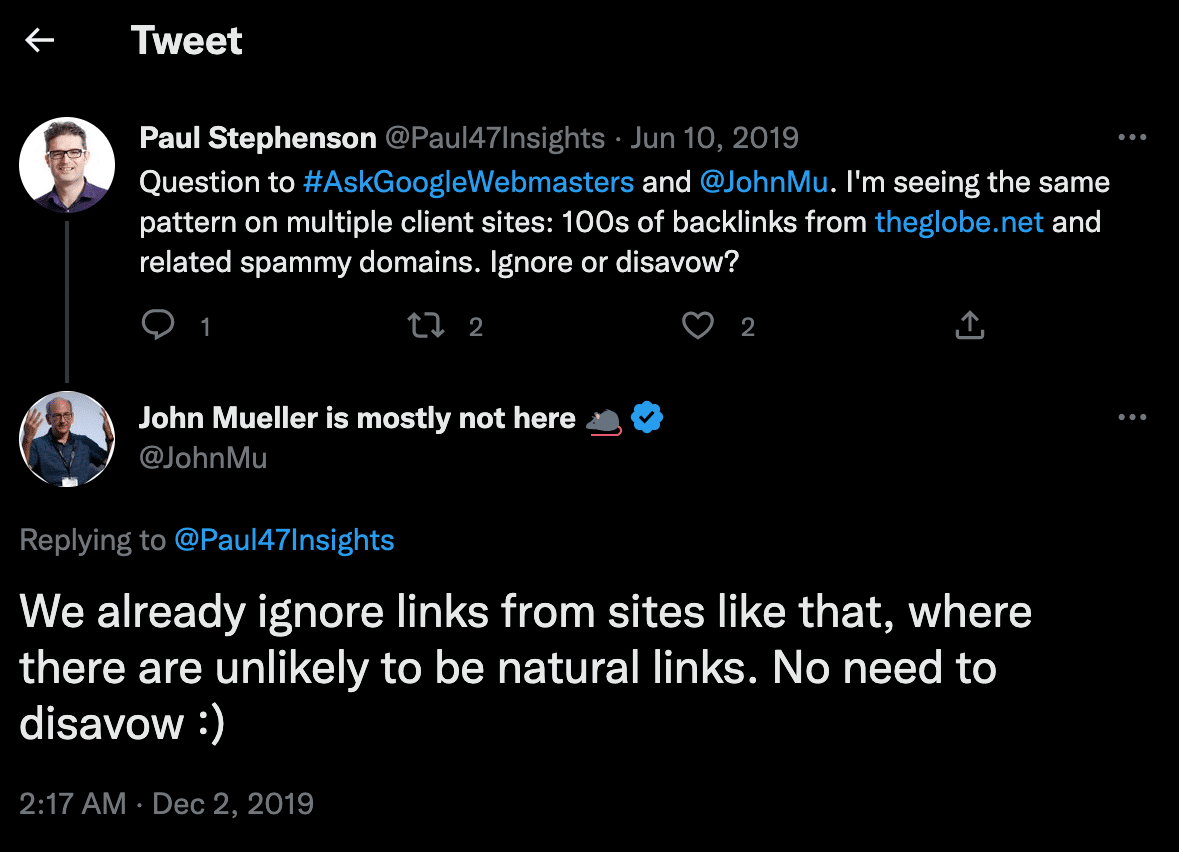
Google ignores many toxic backlinks, but not all of them. Below, you’ll find a list of where toxic backlinks are likely to come from.
Common Sources of Toxic Backlinks
Before you can develop a strategy to clean up and prevent toxic backlinks, it’s important to understand what they look like and where they come from.
Paid Link Schemes
Paid links are one of the most obvious examples of toxic links because they’re as unnatural as could be. Exchanging money for a link with the intent to boost your site’s SEO is against Google Search Essentials. Bad links placed randomly and without context aren’t likely to drive qualified traffic, and they’re going to show up on Google’s radar fast.
However, Google does acknowledge that not all paid links are bad links and that sometimes “buying and selling links is a normal part of the economy of the web for advertising and sponsorship purposes.” In these cases, you can add a rel=”nofollow” or rel=”sponsored” attribute to the link’s <a> tag to qualify and protect these links.
Link Exchanges
Trading links with other sites (“I’ll link to you if you link to me”) is a link scheme when done at scale for SEO purposes. Occasional reciprocal links between genuinely related sites are normal. Coordinated link swaps across unrelated sites are not. A one-off swap with a well-matched partner isn’t necessarily going to get you penalized, but it’s not going to have much impact either. Quid pro quo links rarely carry the weight of one earned on merit.
Links That Lack Relevance
Links that lack relevance within the context of a piece of content or a website can be considered toxic, especially if used in excess.
Links From Low-Quality Sites
Backlinks from low-quality sites can sometimes be considered toxic, especially if the site operates primarily as an SEO link farm, a group of websites that exist for no purpose other than to artificially inflate the page rank of another site. Sites with very low DR and DA scores are prime candidates for this type of toxic link.
Private Blog Networks (PBNs)
Private Blog Networks are networks of sites built for the purpose of posting content and linking to it from other blogs in the network. Experts can usually spot these networks easily, and Google actively penalizes them. According to recent research by Semrush, PBN links were the third most common reason for link penalizations among their sample of penalized sites.
If you’ve ever bought SEO services from a provider who mentioned “network” links or guaranteed placements at high volume, review your backlink profile.
Link-Building Bots and Automated Spam
Automated tools that post links across comment sections, forums, and directories can flood your profile with low-quality links. These are often easy to spot by their volume and the irrelevance of the sites they appear on.
Comment Spam
Placing links in irrelevant forums or discussion posts is a legacy link-building strategy that Google frowns upon. These links are obviously unnatural, andGoogle’s algorithms can pick up on this tactic.
Excessive Keyword-Rich Anchor Text
Having an excessive amount of exact-match keyword backlinks can be considered a toxic link-building strategy (ex: a large number of links pointing back to your site with the anchor text “buy shoes now”).
Natural link profiles have a mix of branded anchors, partial match, generic text (“click here,” “read more”), and bare URLs. An unnaturally high concentration of exact-match anchors can trigger scrutiny.
Spun Content
Spun content is content created by software to produce multiple variations of the same original piece. Placing links in these pieces and uploading them across the net was once a popular way to gain backlinks, but these links are toxic.
Low-Quality Directory Links
Directories can sometimes be a useful tool for getting your name out there and even scoring some valuable backlinks. But not all directories are equal. Some directories are spammy and offer little value to visitors. It’s a good idea to avoid being listed in these, especially if they are irrelevant to your industry.
Excessive Guest Post Links
Guest posting is a valuable link-building strategy. However, using this tactic excessively to gain links from low-quality, irrelevant, or spammy sites is a no-go, and Google’s Matt Cutts even called out the practice in 2014.
The same logic applies to syndicating press releases purely to plant links: wire services exist to announce real news, and blasting a release across dozens of low-quality sites for the backlink alone reads as manipulative and dilutes the credibility of releases you send for actual announcements.
Negative SEO Attacks
Some bad actors will attempt to harm your website by sending toxic backlinks to it. If you see a sudden spike in low-quality links you can’t account for, that’s worth investigating before the links start to affect your rankings.
Hacked Website Backlinks
Links from compromised sites can become toxic even if they were fine when first acquired. This is a good reason to monitor your backlink profile on a recurring basis rather than only when you notice a rankings drop.
Link building is not a black-and-white discussion. While some links are obviously high-quality and others are obviously toxic, there is gray space in between.
How To Find Toxic Backlinks
To find toxic links in your backlink profile, perform a thorough backlink audit and carefully comb through each backlink on your site.
Use a Toxic Backlink Checker
Backlink checkers like Semrush’s Backlink Auditing Tool assign each link a toxicity score on a 0-100 scale (0 = clean, 100 = extremely toxic) and flags those most likely to harm your profile. Ahrefs Site Explorer can help you dive into your site’s backlink profile to gain a better understanding of where links are coming from and their toxicity score. Moz, Monitor Backlinks, and Majestic offer comparable link-profile tools if you’d rather cross-check toxicity scoring across platforms before deciding what to disavow. These tools can identify any toxic or potentially toxic links in your backlink profile and provide you with specific information about the originating domains, the toxicity score of the backlinks in question, and more.
You can also use Google Search Console Links report to see where your backlinks are coming from. Open the property, click Links in the left-hand navigation, then select More under Top Linking Sites to see up to 1,000 referring domains; from there you can click into any domain to see which of your pages it links to, or click into a page to see who links to it, and export the data if you want to review it elsewhere.
While this method doesn’t have the same functionality as a paid tool like Semrush or Ahrefs, it is free and available to everyone. It won’t score toxicity for you, either, so you will need to familiarize yourself with the domains linking to your site to determine which ones aren’t legitimate.
How to Manually Identify Toxic Backlinks
When scanning referring domains, look for:
- Spammy sites (fake pharmaceutical sites, adult sites, sites with long strings of letters and numbers).
- Sites with a high toxicity score in Semrush.
- Sites that publish scraped or duplicated content instead of anything original.
- Sites that link out to a random mix of unrelated industries at high volume, a sign of a link farm.
- Sites with no visible engagement, like comments or shares, and no recent updates.
Even if some domains don’t have a high toxicity score, they can still be dangerous. Similarly, even if some domains have a high toxicity score, they may not be dangerous. You may need to visit sites that you don’t recognize to determine whether you should disavow them.
How To Fix Toxic Backlinks
There are two ways to fix toxic backlinks: contact the linking site owner to request removal, or disavow them in Google Search Console.
Request Link Removals
The advantage of requesting a link removal directly from a site admin is that it removes the link from the web completely, not just for SEO purposes. Looking for a site admin’s email and communicating with them directly can be time-consuming, but it’s worth it in many cases. Backlink auditing tools like the ones from Ahrefs and Semrush offer email integration that makes finding addresses and sending emails much easier.
Keep a record of your outreach. If you later need to submit a disavow file, having documentation that you attempted manual removal strengthens your case.
Disavowing Backlinks
Disavowing is the more immediate way to remove a toxic link. A disavow request tells Google to ignore the link so it doesn’t affect your site’s SEO. If you have a large number of spammy, low-quality backlinks and your links have already caused (or are likely to cause) a manual action, Google suggests disavowing the troublesome links.
Proceed with caution; don’t inadvertently disavow good links.
Disavowing backlinks is a straightforward process that you can complete in two steps.
Step 1: Build a disavow file.
Create a plain-text (.txt) file listing the URLs or domains you want Google to ignore. You can disavow at the domain level (which covers all links from that domain) or at the URL level (which targets a specific page).
Domain-level disavow:
domain:example-spamsite.com
URL-level disavow:
Your disavow file will be a simple text file (.txt) which you can populate with the addresses of the links you would like to disavow. Since Google Docs can be exported as .txt, you can easily open a Doc and paste the URLs you want to disavow into it.
You can disavow specific URLs and entire domains, but not specific subpaths.
For example, the following is acceptable:
example.com/resources/blog-post-1/
But not the following:
example.com/resources
As you add lines to the file, you can include comments alongside entries by starting a line with the “#” symbol. GSC will understand these lines as additional comments, and not as URLs to disavow.
Note: A disavow file must be under 2 MB and 100,000 lines in size, and must be UTF-8 or 7-bit ASCII.
Step 2: Upload your disavow file to Google Search Console
Navigate to Google Search Console’s disavow tool.
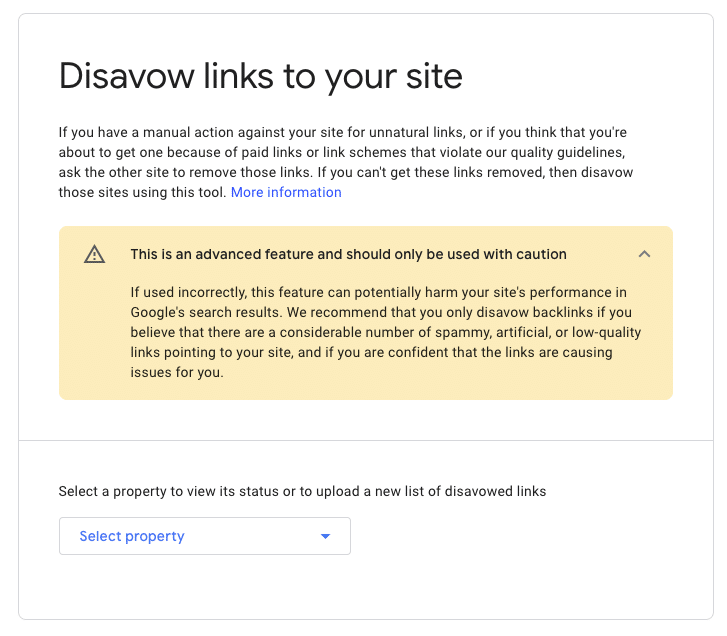
Select a property (website) from the list, click the upload button, and add your file.
If your upload is successful, it can take Google several weeks to apply its modifications as it recrawls the web. If there are errors in the file, the tool will provide you with a list of what to fix. Google will not accept or upload the new disavow file until those errors are taken care of.
If you already have a disavow file in place, you’ll get a button that says “Replace.” If you are updating your disavow file this way, it may be a good idea to download a backup copy of the old file first.
Even though Google will disallow the links in your report, they’ll still show up in Google Search Console, so don’t be alarmed.
You can always download your disavow file directly from Google Search Console if you’d like to see an up-to-date list of disavowed links or to back up your current version. This is especially useful if you’re taking over a website and looking into its backlink profile for the first time.
If you ever want to re-introduce all previously disallowed links, you don’t have to go through your file line by line. From the Disavow Links Tool page, select the property and click ‘Cancel Disavowals’ to wipe the disavowal list clean.
How To Prevent Future Toxic Backlinks
Cleaning up toxic backlinks is reactive work. The goal is to get ahead of the problem so you’re not running a backlink audit in response to a rankings drop. These practices won’t eliminate every bad link that points to your site, but they can reduce the volume significantly and make your profile easier to manage over time.
Monitor Your Backlink Profile Regularly
A quarterly backlink audit catches problems before they compound. Set up alerts in Semrush or Ahrefs to flag new links as they come in, particularly large influxes of links from new domains over a short period.
Vet Your Link-Building Partners and Vendors
If you’re working with an external agency or contractor on link building, understand exactly where the links are coming from. Guaranteed link placements at low cost are often a sign of PBN use or link schemes. Ask for site-by-site transparency before any campaign begins.
Use Proper Link Attributes for Paid Placements
Any paid link, sponsored content, or affiliate link should carry rel=”sponsored” or rel=”nofollow”. This protects you from having those links counted against your profile if Google determines the placement was paid. The same care applies in the other direction: toxic links aren’t only a problem when they point at your site. Add rel=”nofollow” or rel=”ugc” to comments and forum posts you don’t control so Google doesn’t read them as an endorsement you didn’t intend to give.
Build a Strong Natural Link Profile
Removing toxic links doesn’t replace building good ones. A sound backlink strategy means regularly adding high-quality links to your profile. That means links from sites that are curated by real people, updated regularly with original content, and that use natural-sounding anchor text instead of shoehorning in keywords.
A backlink profile with a diverse, growing set of high-quality editorial links is also more resilient to toxic backlink damage. When the overwhelming majority of your links come from legitimate sources, a cluster of spam links has less leverage over your rankings.
If you’re rebuilding after a penalty for bad links, editorial coverage, local citations, link reclamation, and guest blogging are the levers that support recovery, since they add real, earned links rather than more of what caused the problem in the first place.
Support Your Link-Building Strategy With a Trusted Partner
Addressing toxic backlinks is one part of a healthy link strategy. The other part is consistently earning high-quality links that build genuine authority. Our link building services take a transparent approach to growing your backlink profile with links that hold up over time. Book a free consultation to talk through where your profile stands and what it would take to make progress.
Toxic Backlink FAQs
What is a toxic backlink?
A toxic backlink is a link acquired unnaturally that has the potential to hurt your site’s SEO because it goes against Google’s Webmaster Guidelines.
How do toxic backlinks affect SEO?
Toxic backlinks can trigger algorithmic penalties (where Google updates its systems to discount or penalize manipulative link profiles) or manual actions (where a Google reviewer directly penalizes your site). Either can cause significant ranking drops. In other cases, Google may ignore the toxic links entirely, but you can’t confirm which scenario applies to your site without auditing.
How do I identify toxic links?
Use a backlink audit tool to score your referring domains. Look for high toxicity or spam scores, domains with no real content, irrelevant foreign-language sites, link directories with no editorial standards, and unusual spikes in new referring domains. A manual review of flagged domains is worth your time for anything borderline.
What should I do if I find toxic backlinks?
Start by identifying the worst offenders using a backlink audit tool. Reach out to the site owner directly and request removal or create a disavow file and upload it to Google Search Console. Prioritize removing the links with the highest toxicity scores, manipulative anchor text, or links that arrived in suspicious spikes.
Should I check the link profiles of sites that link to me?
It’s worth a look, especially for domains sending you a lot of links. The same signals you’d use to evaluate your own backlink profile, like thin content, foreign-language spam, or no real audience, apply here too. It takes extra time, but it adds a layer of confidence that the links pointing at you are coming from real, active sites.
How do I fix toxic backlinks?
You have two options: request removal directly from the site owner, or disavow the link via Google Search Console’s Disavow Links Tool. For large-scale spam (particularly negative SEO attacks), disavowing is faster. For isolated cases, direct removal is cleaner because it takes the link off the web entirely. Once you’ve cleaned up or disavowed the links, it can take anywhere from several weeks to a few months for Google to recrawl and reflect the change in your rankings, depending on how severe the penalty was.
Do I need to get more backlinks after disavowing links?
Ideally, yes. Keeping your backlink profile clear of toxic links is just one piece of the puzzle and is not a substitute for acquiring high-quality backlinks. A solid backlink strategy is one that seeks to consistently grow the number of quality links in your backlink profile.
Do backlinks still matter in 2026?
Yes. Backlinks remain a significant ranking factor. Google uses the quality and relevance of links pointing to a page as a core signal of authority. What has changed is that Google is now even better at discounting low-quality links and rewarding links that come from authoritative, contextually relevant sources. Volume-based link building has diminishing returns. Quality and relevance matter more than they used to.
How can I prevent future toxic backlinks?
Monitor your backlink profile quarterly, set up alerts for new link spikes, vet any link-building vendors carefully, and use proper link attributes on paid placements. Building a strong natural link profile through content and digital PR also makes your site more resilient to spam attacks.